Gemini vs DeepSeek: One holographic tree, six reasoning modes
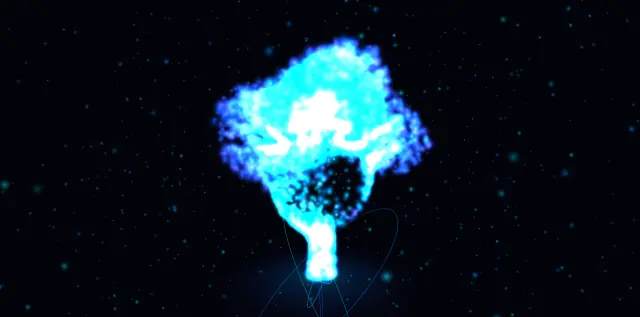
The same very specific brief, given to Gemini and DeepSeek at three levels of thinking each. One of the six drew nothing at all. Another drew the projection rings and forgot the tree. Thinking longer helped — but not in the way the marketing suggests.
Gemini 3.6 Flash (High)vsGemini 3.6 Flash (Thinking)vsGemini 3.6 Flash LitevsDeepSeek (Fast)vsDeepSeek (Expert)vsDeepSeek (Expert, deep thinking)

Too close to call
Gemini
- Technical score
- 89
- Web app completion time
- not recorded
- Requirements met
- 8/9

Gemini
- Technical score
- 89
- Web app completion time
- not recorded
- Requirements met
- 8/9
Gemini
- Technical score
- 89
- Web app completion time
- not recorded
- Requirements met
- 8/9
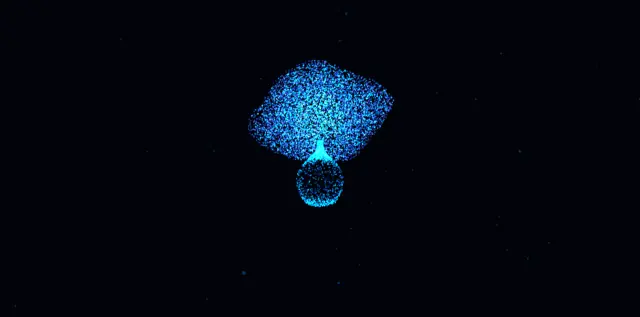
DeepSeek
- Technical score
- 89
- Web app completion time
- not recorded
- Requirements met
- 8/9
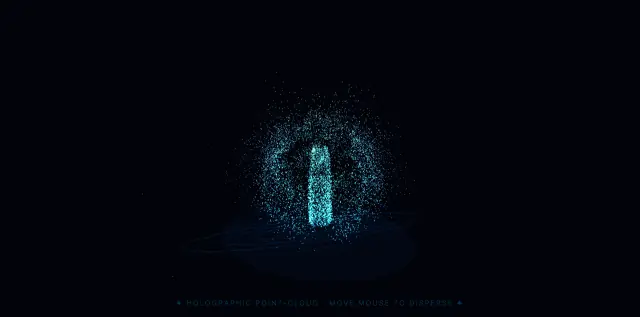
DeepSeek
- Technical score
- 78
- Web app completion time
- not recorded
- Requirements met
- 7/9

DeepSeek
- Technical score
- 89
- Web app completion time
- not recorded
- Requirements met
- 8/9
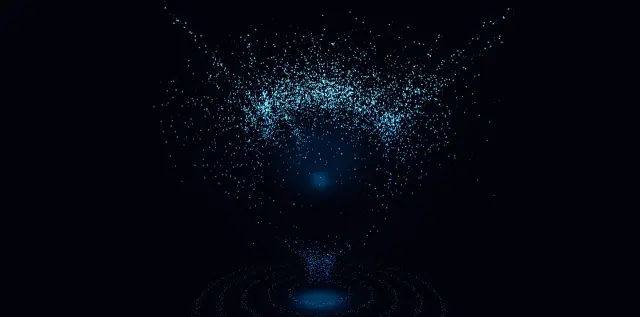
Word for word, as both models received it
Create a futuristic full-screen interactive website featuring a holographic tree made entirely from thousands of glowing particles.

Everything must be built inside ONE single self-contained HTML file, including HTML, CSS, and JavaScript.

Do not create multiple files.

The result must open directly in a browser and work immediately.

PAGE LAYOUT:
- Full-screen experience.
- Exactly 100vw wide and 100vh high.
- Absolutely no scrolling in any direction.
- Use overflow: hidden.
- No navigation bar.
- No header.
- No footer.
- No cards.
- No buttons.
- No unnecessary interface elements.
- The visual experience should occupy the entire screen.

VISUAL STYLE:
Imagine a dark futuristic sci-fi hologram interface.

The background should be almost black with a very subtle deep navy-blue tone.

In the exact center of the screen, create a large glowing tree constructed entirely from thousands of tiny luminous blue particles.

The tree should look like a 3D point-cloud hologram.

The particle tree must have:

- A narrow but clearly visible trunk rising vertically from the center.
- The trunk should gradually split into multiple organic branches.
- A very wide, dense, rounded tree canopy.
- The canopy should feel irregular and natural rather than perfectly symmetrical.
- Thousands of individual blue, cyan, electric-blue, and slightly violet particles.
- Brighter cyan particles near the center and slightly darker blue particles toward the edges.
- Different particle sizes to create visual depth.
- Some particles should appear sharper and brighter while others are smaller and dimmer.
- The overall tree should feel volumetric, three-dimensional, soft, luminous, and holographic.
- The particle density should clearly define the silhouette of a large mature tree.

The tree must NOT be a static image.

The actual shape of the tree must be generated using particle positions.

The final visual should resemble a futuristic holographic point-cloud tree floating in a dark digital environment.

HOLOGRAPHIC BASE:
Directly underneath the tree, create a futuristic projection platform using glowing neon-blue concentric rings.

The rings should:

- Be centered directly below the tree trunk.
- Look like thin elliptical circles viewed in perspective.
- Have several different radii.
- Glow softly with electric-blue light.
- Fade gradually toward their edges.
- Look like the tree is being projected upward from a holographic scanner.
- Include a soft blue glow beneath the trunk.
- Optionally add subtle rotating arcs, dotted rings, or scanning lines.

The tree should appear to emerge vertically from the center of these holographic rings.

BACKGROUND:
Add sparse tiny blue and white particles throughout the dark background.

These particles should resemble distant digital stars or floating dust.

Keep them subtle so they do not compete visually with the main tree.

You may also add:

- faint blue haze,
- subtle radial glow behind the tree,
- soft atmospheric depth,
- tiny slowly drifting particles,
- minimal sci-fi grid or circular traces near the bottom.

Do not make the background busy.

MOUSE INTERACTION — VERY IMPORTANT:
The mouse must physically interact with the particles forming the tree.

Continuously track the mouse cursor.

When the mouse cursor approaches the tree:

- Nearby tree particles must move away from the cursor.
- The cursor should behave like an invisible repulsive force field.
- Particles closest to the cursor should move the strongest.
- Particles slightly farther away should move less.
- The interaction radius should be large enough to clearly see the tree opening around the mouse.

When the user moves the mouse directly through the canopy:

- The particles should scatter outward.
- A visible temporary hole or distortion should appear in the tree.
- Individual particles should fly away smoothly from the cursor.
- The effect should feel fluid, organic, and physical.

Do NOT instantly teleport particles.

Use velocity, damping, interpolation, spring physics, or easing.

When the mouse moves away:

- Every displaced particle should smoothly return to its original tree position.
- The tree should naturally reconstruct itself.
- Use spring-like restoration.
- Avoid snapping particles back instantly.
- Add slight overshoot or inertia if appropriate.

The particle system should feel like a flexible cloud of glowing dust.

The interaction must affect both:
- the tree canopy,
- the branches,
- and the trunk.

The user should be able to move the mouse anywhere across the tree and visibly disturb the particles.

PARTICLE PHYSICS:
Each tree particle should have:

- an original/home position,
- a current position,
- a velocity.

During animation:

1. Calculate the distance between each particle and the mouse.
2. If the particle is inside the interaction radius, apply a repulsion force.
3. Apply a spring force pulling the particle toward its original position.
4. Apply damping to the velocity.
5. Update the particle position.

Use smooth physics rather than simple position replacement.

IDLE ANIMATION:
Even when the mouse is not moving, the tree should feel alive.

Add very subtle motion such as:

- slow breathing,
- tiny particle oscillation,
- gentle noise,
- light wind-like movement,
- very small random drifting,
- subtle glow pulsing.

The movement must remain subtle enough that the tree silhouette stays recognizable.

3D DEPTH:
Create a convincing three-dimensional point-cloud effect.

If possible:

- Give particles X, Y, and Z coordinates.
- Use perspective projection.
- Make particles slightly smaller and darker when farther away.
- Make closer particles slightly larger and brighter.
- Allow very subtle automatic camera movement or parallax based on mouse position.
- Keep the tree centered on screen.

A very subtle slow rotation of the particle tree is acceptable, but it should not rotate aggressively.

RENDERING:
Prefer WebGL or Three.js for performance and a stronger 3D effect.

You may load Three.js from a CDN inside the single HTML file.

If Three.js is used:

- Use THREE.Points.
- Use BufferGeometry.
- Use custom particle positions.
- Use additive blending.
- Use transparent particles.
- Disable depth writing when appropriate for the holographic glow.
- Use PointsMaterial or a custom ShaderMaterial.
- Use requestAnimationFrame.

If Canvas 2D is used instead, optimize the drawing carefully.

PERFORMANCE:
The animation should remain smooth.

Target approximately 5,000–15,000 particles depending on device performance.

Use requestAnimationFrame.

Avoid creating new objects inside the animation loop whenever possible.

Use typed arrays and BufferGeometry if using WebGL.

RESPONSIVENESS:
The tree must scale according to viewport size.

Desktop should show a large dramatic tree occupying roughly:

- 65–80% of the viewport width,
- 65–80% of the viewport height.

The full canopy should remain visible.

The holographic rings should remain visible underneath it.

The composition must always stay centered.

COLOR PALETTE:
Use primarily:

Background:
#02030A
#040713
#071020

Particles:
#005BFF
#008CFF
#00B7FF
#2D5BFF
#5848FF

Bright highlights:
#00E5FF
#66F3FF

Glow:
deep electric blue and cyan.

Avoid warm colors.

Overall appearance:
dark, elegant, technological, cinematic, premium, futuristic, holographic, immersive.

IMPORTANT DESIGN RULES:
- Do not make it look like a normal illustrated tree.
- Do not use solid leaves.
- Do not use normal branch textures.
- Do not use a tree PNG.
- Do not use a background image.
- Do not fake the effect with a static visual.

The entire visible tree must be made from individual glowing particles.

The viewer should clearly see thousands of individual dots forming the tree.

The mouse must visibly scatter those same dots.

When interaction stops, the dots must reform the original tree.

FINAL RESULT:
The finished page should feel like a futuristic interactive holographic visualization from a science-fiction interface.

A large luminous blue particle tree should float above glowing circular projection rings in a completely dark environment.

The most important visual moment is when the user moves the mouse through the tree and thousands of glowing particles smoothly move away from the cursor, creating a dynamic opening in the particle cloud, then gently flow back into place.

OUTPUT ONLY THE COMPLETE FINAL HTML CODE.

Do not explain the code before or after it.

The response must contain one complete HTML document starting with <!DOCTYPE html> and ending with </html>.
Scroll inside the box for the rest of the brief.
Requirements met
| Requirement | Gemini 3.6 Flash (High) | Gemini 3.6 Flash (Thinking) | Gemini 3.6 Flash Lite | DeepSeek (Fast) | DeepSeek (Expert) | DeepSeek (Expert, deep thinking) |
|---|---|---|---|---|---|---|
| Fills the frame rather than sitting on the floor | Met | Met | Met | Met | Not met | Met |
| Actually draws something when opened | Met | Met | Met | Met | Met | Met |
| One self-contained file, working straight from disk | Not metLoads from cdnjs.cloudflare.com | Not metLoads from cdnjs.cloudflare.com | Not metLoads from cdnjs.cloudflare.com | Not metLoads from unpkg.com | Not metLoads from unpkg.com | Not metLoads from cdn.jsdelivr.net |
| Nothing scrolls in any direction | Met | Met | Met | Met | Met | Met |
| No navigation, header, footer or buttons | Met | Met | Met | Met | Met | Met |
| The tree is built from particle positions | Met | Met | Met | Met | Met | Met |
| Mouse pushes the particles apart | Met | Met | Met | Met | Met | Met |
| Animated with requestAnimationFrame | Met | Met | Met | Met | Met | Met |
| Typed arrays or BufferGeometry for the point cloud | Met | Met | Met | Met | Met | Met |
Automated checks
Gemini 3.6 Flash (High)
Gemini 3.6 Flash (High) · web app
- Total size
- 18.7 KB
- Painted area
- 6.7%
- Files produced
- 1
- Outside requests
- cdnjs.cloudflare.comfailed
- Technical score
- 89
Gemini 3.6 Flash (Thinking)
Gemini 3.6 Flash (Thinking) · web app
- Total size
- 20.1 KB
- Painted area
- 18.4%
- Files produced
- 1
- Outside requests
- cdnjs.cloudflare.comfailed
- Technical score
- 89
Gemini 3.6 Flash Lite
Gemini 3.6 Flash Lite · web app
- Total size
- 13.0 KB
- Painted area
- 5.2%
- Files produced
- 1
- Outside requests
- cdnjs.cloudflare.comfailed
- Technical score
- 89
DeepSeek (Fast)
DeepSeek (Fast) · web app
- Total size
- 14.6 KB
- Painted area
- 3.5%
- Files produced
- 1
- Outside requests
- unpkg.comfailed
- Technical score
- 89
DeepSeek (Expert)
DeepSeek (Expert) · web app
- Total size
- 18.9 KB
- Painted area
- 4.1%
- Files produced
- 1
- Outside requests
- unpkg.comfailed
- Technical score
- 78
DeepSeek (Expert, deep thinking)
DeepSeek (Expert, deep thinking) · web app
- Total size
- 41.3 KB
- Painted area
- 6.9%
- Files produced
- 1
- Outside requests
- cdn.jsdelivr.netfailed
- Technical score
- 89
Timings are measured in each provider’s consumer web app, so they include network and interface conditions — they are not model inference latency.